If you searched free Nano Banana Pro, start here: test text rendering, learn prompt structure, and decide when to upgrade. Jump to Workbench, Prompt Library, or Pricing.
When you type free Nano Banana Pro, you're usually trying to test image quality (especially text rendering) before you commit time or money.
Treat free Nano Banana Pro as a trial workflow: generate a small batch, validate your prompt structure, then decide if you need more volume.
If you came from searches like "nano banana pro free unlimited", read Nano Banana Pro pricing explained or browse the blog after you test this workflow.
For fastest results with free Nano Banana Pro, use Workbench to iterate and Prompt Library to start from templates.
Use free Nano Banana Pro to validate fast: readability, consistency, and convergence speed.
free Nano Banana Pro is great for learning, but expect trade-offs. Confirm fit-don't build an infinite pipeline on a trial tier.
For posters, product cards, or thumbnails, a simple structure beats creative chaos. Make the model follow copy and layout first.
Write the exact headline in quotes, specify placement, then describe the scene. Avoid vague prompts.
headline: "YOUR TEXT HERE"
placement: top header / center label
style: clean poster, high contrast
The biggest mistake is too much copy. Short text, contrast, and clear hierarchy win.
Before export, verify spelling, alignment, and contrast. For examples, read the prompt guide.
These examples come from the Prompt Library. Use them as-is to validate text rendering, then adapt headline and placement for your own design.
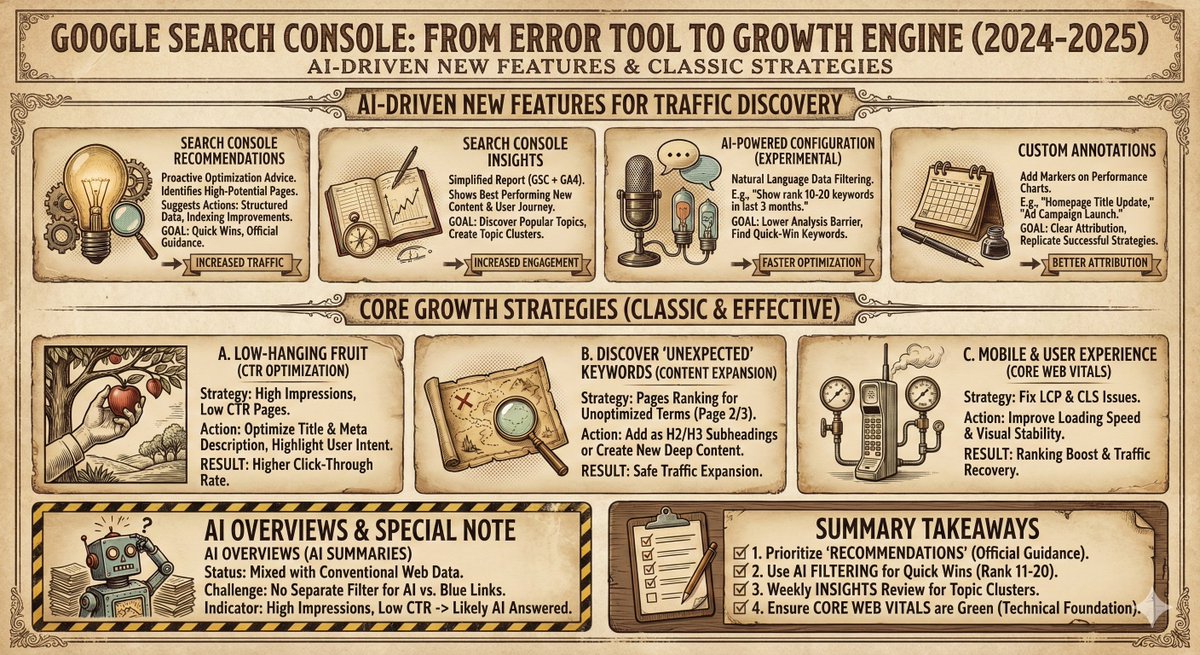
xxxxx, please generate an infographic, using the style 【{argument name="style" default="xxxx"}】.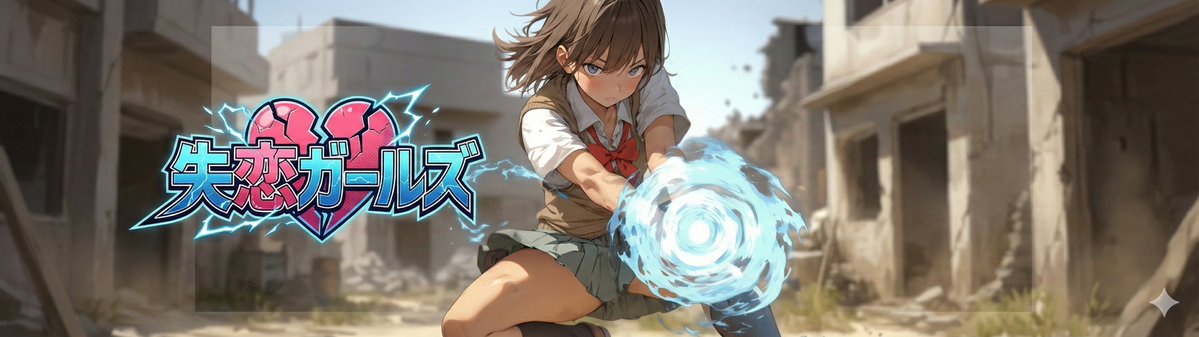
# ===== USER CONTROLS =====
title_text: "{argument name="display string" default="<<YOUR_TEXT>>"}"
title_style_preset: "{argument name="logo design preset" default="cool"}"  # cool, cute, cool_cute, luxury, pop, cyber, minimal, retro, kawaii
face_zoom: "{argument name="zoom on/off" default="off"}"            # off, on

subject: >
  Create a 21:6 wide banner using the provided reference image content.
  The primary face must be centered inside an invisible safe zone (not drawn),
  and a title logo (derived from title_text + title_style_preset) must be placed inside the same safe zone.

composition: >
  Aspect ratio 21:6.
  Invisible safe zone (DO NOT draw it):
  - Left margin: 15% of width
  - Right margin: 15% of width
  - Top margin: 16% of height
  - Bottom margin: 16% of height
  Keep the entire face AND the entire title logo fully inside this safe zone.
  Background may extend to the edges.

action: >
  Place the reference image content with maximum fidelity.
  Auto-crop/scale/reposition to fit a 21:6 banner with no stretching.
  Detect the primary face (if multiple faces, pick the largest/most prominent).
  Center the primary face within the safe zone both horizontally and vertically.
  Never crop off the face/eyes; keep the full face comfortably inside the safe zone (not near edges).

  Face zoom behavior:
  - If face_zoom is OFF: keep the original framing as much as possible while still centering the face in the safe zone.
  - If face_zoom is ON: zoom/crop to a bust-up portrait centered on the face
    (head and shoulders visible; include upper chest; do no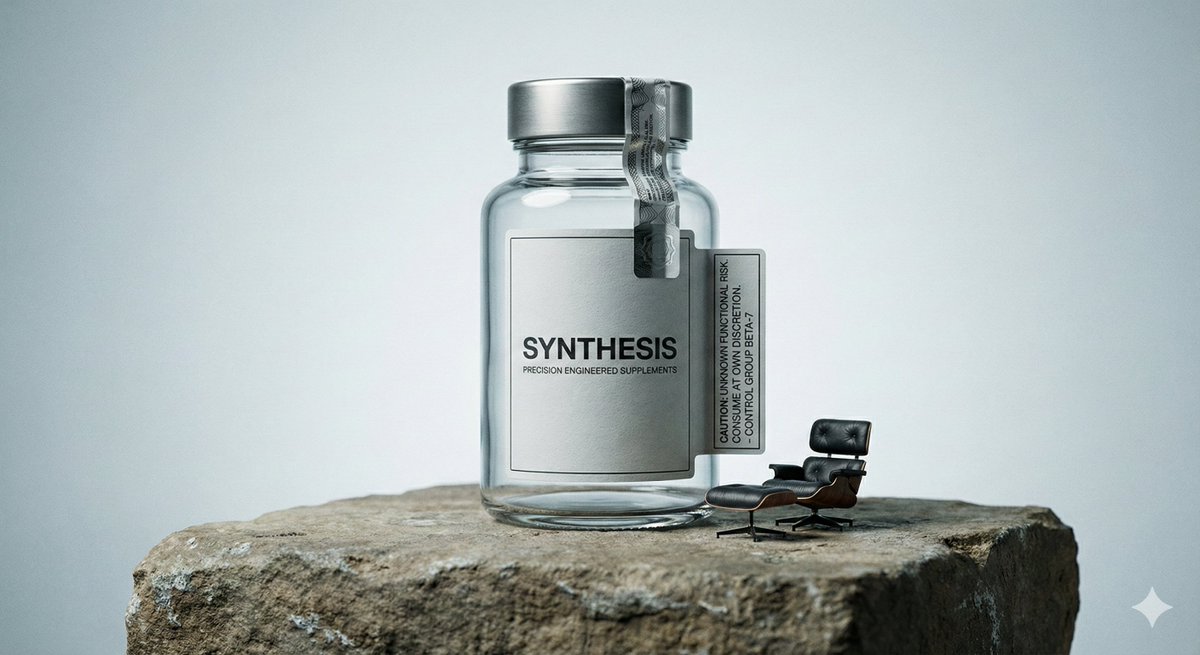
一组冷静、高质感的产品摄影画面。

画面主体是一瓶高端营养补充剂,瓶身完整、干净,密封防拆封条仍然保留,整体呈现出高度精密、被严格控制的工业产品状态。产品被放置在一块哑光石材表面上,石材质地粗粝、自然、略显陈旧,与产品的精致形成对比。

画面中出现明显的“功能错位”细节:在营养补充剂瓶旁,摆放着一把比例明显不合理的{argument name="迷你道具" default="迷你躺椅"},像是为人休息而准备,却无法真正使用,只是象征性地存在。同时,瓶身或附近贴有一张醒目的警示标签,文字理性、冷淡,却无法明确说明风险来自哪里。

整体构图采用正面居中方式,画面稳定、克制,没有戏剧化角度,强调产品本身的存在感与材质细节。使用柔和但具有方向性的棚拍光线,清晰呈现瓶身的反光、标签纸张的质感、防拆封条的细节,以及石材表面的微小纹理。

微型道具组合:随机Use Free to learn and validate outcomes. Switch to Pro when volume, consistency, or resolution becomes the bottleneck.
| Feature | Free | Pro |
|---|---|---|
| Best for | First-time trials, learning the workflow, quick validation | Repeatable production, teams, higher volume usage |
| free Nano Banana Pro text rendering stability | Good for testing recipes and short headlines | Better for consistent output across batches |
| Iteration volume | Limited / trial-focused | Higher throughput when you need predictable delivery |
| Resolution and export | Enough for evaluation | More options for production-ready assets |
| Use cases | Thumbnails, drafts, prompt experiments | Ads, product cards, infographics, brand deliverables |
| When to upgrade | When you can already get a good sample result | When you need repeatability + volume without friction |
If free Nano Banana Pro helped you confirm fit, go to Pricing to choose a plan-or open Workbench to keep iterating with a tighter workflow.
For faster prompting, open Prompt Library. For deeper how-tos, browse the blog.
